
Seperti yang sudah kita ketahui, fetch memanfaatkan promise dalam melakukan tugasnya, sehingga network request yang dibuat menggunakan fetch akan selalu berjalan asynchronous.

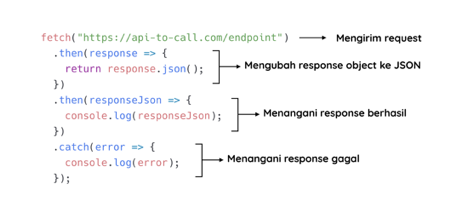
Penggunaan dasar dari fetch tampak seperti ini:
20200313194951a9ddbc715b419aa9f5c19cfd5cb5ffae.png
Network request dilakukan pada saat fungsi fetch() tereksekusi.

  1. fetch("https://web-server-book-dicoding.appspot.com/list")


Jika request berhasil diproses oleh server, fungsi fetch() akan mengembalikan promise resolve dan membawa response object di dalamnya. Namun nilai response yang dibawa resolve belum sebagai data JSON yang kita butuhkan, melainkan informasi mengenai response itu sendiri, seperti status code, target url, headers, dsb. Maka dari itu, untuk mendapatkan data JSON yang dibutuhkan, kita perlu mengubah response object ke dalam bentuk JSON dengan memanggil method .json().

  1. fetch("https://web-server-book-dicoding.appspot.com/list")

  2.  .then(response => {

  3.    return response.json();

  4.  })


Method .json() juga mengembalikan nilai Promise, sehingga kita membutuhkan chaining promise dengan menambahkan .then() untuk mendapatkan data JSON yang sesungguhnya.

  1. fetch("https://web-server-book-dicoding.appspot.com/list")

  2.  .then(response => {

  3.    return response.json();

  4.  })

  5.  .then(responseJson => {

  6.    console.log(responseJson);

  7.  })


Lalu jangan lupa juga untuk menambahkan block catch() pada akhir chaining promise untuk menangani apabila rejected promise terjadi baik karena fungsi fetch() atau json().

  1. fetch("https://web-server-book-dicoding.appspot.com/list")

  2.  .then(response => {

  3.    return response.json();

  4.  })

  5.  .then(responseJson => {

  6.    console.log(responseJson);

  7.  })

  8.  .catch(error => {

  9.    console.log(error);

  10.  });


Karena fetch memanfaatkan promise, kita bisa memanfaatkan async/await jika Anda lebih suka dengan gaya penulisan synchronous.

  1. fetch("https://web-server-book-dicoding.appspot.com/list")

  2.  .then(response => {

  3.    return response.json();

  4.  })

  5.  .then(responseJson => {

  6.    console.log(responseJson);

  7.  })

  8.  .catch(error => {

  9.    console.log(error);

  10.  });


  1. async function getBooks() {

  2.  try {

  3.    const response = await fetch("https://web-server-book-dicoding.appspot.com/list");

  4.    const responseJson = await response.json();

  5.    console.log(responseJson);

  6.  } catch (error) {

  7.    console.log(error);

  8.  }

  9. }

  10.  

  11. getBooks();


Advanced Fetch Usage

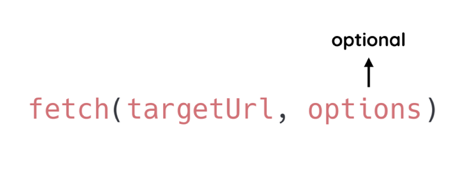
Fungsi fetch() dapat menerima dua buah parameter di dalamnya. Selain menetapkan target URL, kita juga dapat memberikan options untuk menetapkan method, header, body, dsb pada request yang akan dijalankan. Namun penerapan options ini bersifat pilihan. Tidak wajib.
2020031320004200d4bfb205c4a5469bb6063092d38d30.png
Penggunaan fetch() tanpa menerapkan options akan membuat GET request sederhana yang ditujukkan pada targetUrl. Hal tersebut sama seperti yang sudah kita lakukan sebelumnya. Lantas kapan kita perlu menerapkan options pada penggunaan fetch? Berikut beberapa kasus saat kita memerlukannya.

Changing Request Method

Untuk membuat POST request ataupun method request lainnya kita perlu menerapkan options dengan properti method di dalamnya.

  1. fetch("https://web-server-book-dicoding.appspot.com/add", {

  2.  method: "POST"

  3. })


Nilai dari properti method dituliskan dalam bentuk string, contohnya “POST”, “PUT”, “DELETE”, dsb. Nilai default dari properti ini adalah “GET”, sehingga jika kita membuat GET Request, kita tidak perlu menetapkan nilai method secara eksplisit.

Set Header Property

Untuk menambahkan request header dengan fetch kita gunakan properti headers pada options. Contohnya, untuk menambahkan properti Content-Type dengan nilai application/json pada headers kita dapat melakukannya dengan seperti ini:

  1. fetch("https://web-server-book-dicoding.appspot.com/add", {

  2.  method: "POST",

  3.  headers: {

  4.    "Content-Type": "application/json"

  5.  }

  6. })


Tentu kita juga dapat menetapkan lebih dari satu properti pada headers. Contohnya kita tambahkan lagi properti X-Auth-Token dengan nilai 12345.

  1. fetch("https://web-server-book-dicoding.appspot.com/add", {

  2.  method: "POST",

  3.  headers: {

  4.    "Content-Type": "application/json",

  5.    "X-Auth-Token": "12345"

  6.  }

  7. })


Set Data to Body Request

Untuk mengirimkan data pada body request kita gunakan properti body pada options, contohnya seperti ini:

  1. fetch("https://web-server-book-dicoding.appspot.com/add", {

  2.  method: "POST",

  3.  headers: {

  4.    "Content-Type": "application/json",

  5.    "X-Auth-Token": "12345"

  6.  },

  7.  body: JSON.stringify({

  8.    id: 10,

  9.    title: "Edensor",

  10.    author: "Andrea Hirata"

  11.  })

  12. })


Sama seperti XHR, data yang dikirimkan melalui body request perlu diubah menjadi JSON String terlebih dahulu.

  1. body: JSON.stringify({

  2.    id: 10,

  3.    title: "Edensor",

  4.    author: "Andrea Hirata"

  5. })


Contoh kode di atas dapat Anda temukan pada tautan berikut https://repl.it/@dicodingacademy/163-06-AJAX-Fetch-Advanced?lite=true
Anda bisa coba lakukan POST Request menggunakan Fetch dengan menjalankan potongan kode tersebut.
Contoh Ajax Menggunakan Fetch
Bookmark

Contoh Ajax Menggunakan Fetch

Type:
Genre:
Status:
Country:
Keywords: Watch online Contoh Ajax Menggunakan Fetch bahasa Indonesia, Streaming anime Contoh Ajax Menggunakan Fetch sub indo, Mau nonton anime terbaik dengan subtitle Indonesia? Streaming anime Jepang dari anime Contoh Ajax Menggunakan Fetch, website streaming anime subtitle indonesia dan nonton anime indo update setiap hari, TV Contoh Ajax Menggunakan Fetch, Terbaru Terupdate dan Terlengkap dengan Kualitas 1080p, 720p. 480p, 360p Anime Sub Indo.

Comments

Comment Report Rule
Show Comments
9Anime Comment Policies & Guidelines
  1. Spoiling Content

    Definition

    “Anime Comment” is a spoiler-free section and is usually used for a general discussion about anime without spoiling any content.

    “Episode Comment” may contain spoilers for current or previous episodes. Contents from manga or future episodes are considered as spoilers.

    Hiding spoilers with spoiler tags is not allowed either.

    Consequences

    Minor Spoiler:-

    1st Offense: Warning + Temporary Ban (Ranging 1 day to 3 days)

    2nd Offense Within 30 Days of 1st Offense: Permanent Ban

    Major Spoiler:-

    1st Offense: Permanent Ban

  2. Diversion From Topic

    Definition

    The comment section should be about the anime on hand. Although references from other anime may be used, the core topic of the comments should be about the anime at hand.

    This rule also applies on advertising other streaming websites which results in an instant ban.

    This rule also applies to spam, posting comments like “first”, “second”, etc. are considered spam.

    Consequences

    1st Offense: Warning + Temporary Ban (Ranging 1 day to 3 days)

    2nd Offense Within 30 Days of 1st Offense: Permanent Ban

  3. Flame War

    Definition

    Exchange of angry or abusive messages between the comments. Any form of insulting is also considered as flame war.

    Consequences

    1st Offense: Warning + Temporary Ban (Ranging 1 day to 3 days)

    2nd Offense Within 30 Days of 1st Offense: Permanent Ban

  4. Posting Harmful Link

    Definition

    Post of hyperlinks for websites that may contain viruses or may harm your PC or device.

    Consequences

    1st Offense: Permanent Ban + Deletion of All Comments

  5. Posting NSFW Content

    Definition

    Posting contents that are not safe for work, such as pornographic images or video, ecchi anime, hentai, etc.

    Consequences

    1st Offense: Warning + Temporary Ban (Ranging 1 day to 3 days)

    2nd Offense Within 30 Days of 1st Offense: Permanent Ban

  6. Inappropriate Profile Picture

    Definition

    Using a profile picture that is not safe for work. Although minor ecchi or fanservice is acceptable.

    Consequences

    1st Offense: Warning + Temporary Ban (Ranging 1 day to 3 days)

    2nd Offense Within 30 Days of 1st Offense: Permanent Ban

  7. Use of Common Sense

    Definition

    If you think that you’ll get in trouble for what you’re about to do, don’t do it.

    Consequences

    1st Offense: Warning + Temporary Ban (Ranging 1 day to 3 days)

    2nd Offense Within 30 Days of 1st Offense: Permanent Ban

  8. Upvote Abusing

    Definition

    Creating multiple alternative accounts to upvote your own comments.

    Consequences

    1st Offense: Permanent Ban on All Accounts + Deletion of All Comments

  9. Downvote Abusing

    Definition

    Targeting a user and downvoting all his comments, or creating multiple accounts to downvote one or more comments.

    Consequences

    1st Offense: Permanent Ban on All Accounts

  10. Swearing

    Definition

    Swearing is fine, as long as it’s not directed towards anyone, even as a joke. It may be misinterpreted by a moderator.

    Consequences

    1st Offense: Warning + Temporary Ban (Ranging 1 day to 3 days)

    2nd Offense Within 30 Days of 1st Offense: Permanent Ban

  11. Moderator Verdict

    Definition

    A moderator’s verdict is final and arguing with them will only cause further punishment. If you have a complaint against a staff member, or wish to file a ban appeal, go to the 9Anime Discord Server and post your issue in the #disqus-appeals channel.

    Consequences

    1st Offense: Warning + Temporary Ban (Ranging 1 day to 3 days)

    2nd Offense Within 30 Days of 1st Offense: Permanent Ban

Think you have been unfairly warned or banned?

If you believe that you’ve been unfairly banned or if you have a complaint against one or more Disqus Staff Members, you may post an appeal or complaint on 9Anime Discord Server.

STEPS

  1. Join 9Anime Discord Server: https://discord.gg/xxxxxxx
  2. Read the #rules channel and follow instructions. (Optional, but highly recommended)
  3. Head towards #disqus-appeals channel.
  4. Use the appropriate template to appeal a ban or file a complaint.