
Setelah kita mengetahui apa itu Web API dan cara pengujiannya menggunakan Postman, sekarang saatnya kita mempelajari suatu format yang biasa digunakan dalam transaksi data menggunakan Web API, yaitu JSON.

Jauh pada materi sebelumnya, atau jika Anda sudah mengikuti kelas Belajar Dasar Pemrograman Web,  tentunya Anda sudah mengenal dan menggunakan JSON bukan? Pada materi kali ini kita akan membahas JSON lebih detail lagi.
JSON sendiri adalah singkatan dari JavaScript Object Notation. JSON merupakan format yang sering digunakan dalam pertukaran data. Saat ini JSON banyak diandalkan karena formatnya berbasis teks dan relatif mudah dibaca.
Bukan hanya JavaScript, walaupun memiliki nama JavaScript Object Notation, format JSON ini dapat digunakan oleh hampir semua bahasa pemrograman yang ada. Jika Anda belajar fundamental dalam membangun aplikasi Android pada kelas Dicoding, baik menggunakan Kotlin ataupun Java, Anda akan berhadapan dengan JSON untuk transaksi datanya.
Lalu seperti apa sebenarnya rupa JSON ini? Struktur JSON dapat terbentuk dari 2 (dua) literal data, yakni objek dan array.

  1. {

  2.     "error": false,

  3.     "message": "success",

  4.     "books": [

  5.     {

  6.     "id": 1,

  7.     "title": "Laskar Pelangi",

  8.     "author": "Andrea Hirata"

  9.     },

  10.     {

  11.     "id": 2,

  12.     "title": "Filosofi Kopi",

  13.     "author": "Dewi Lestari"

  14.     },

  15.     {

  16.     "id": 3,

  17.     "title": "Clean Code",

  18.     "author": "Robert C Martin"

  19.     }

  20.    ]

  21. }

  22.  

  23.  


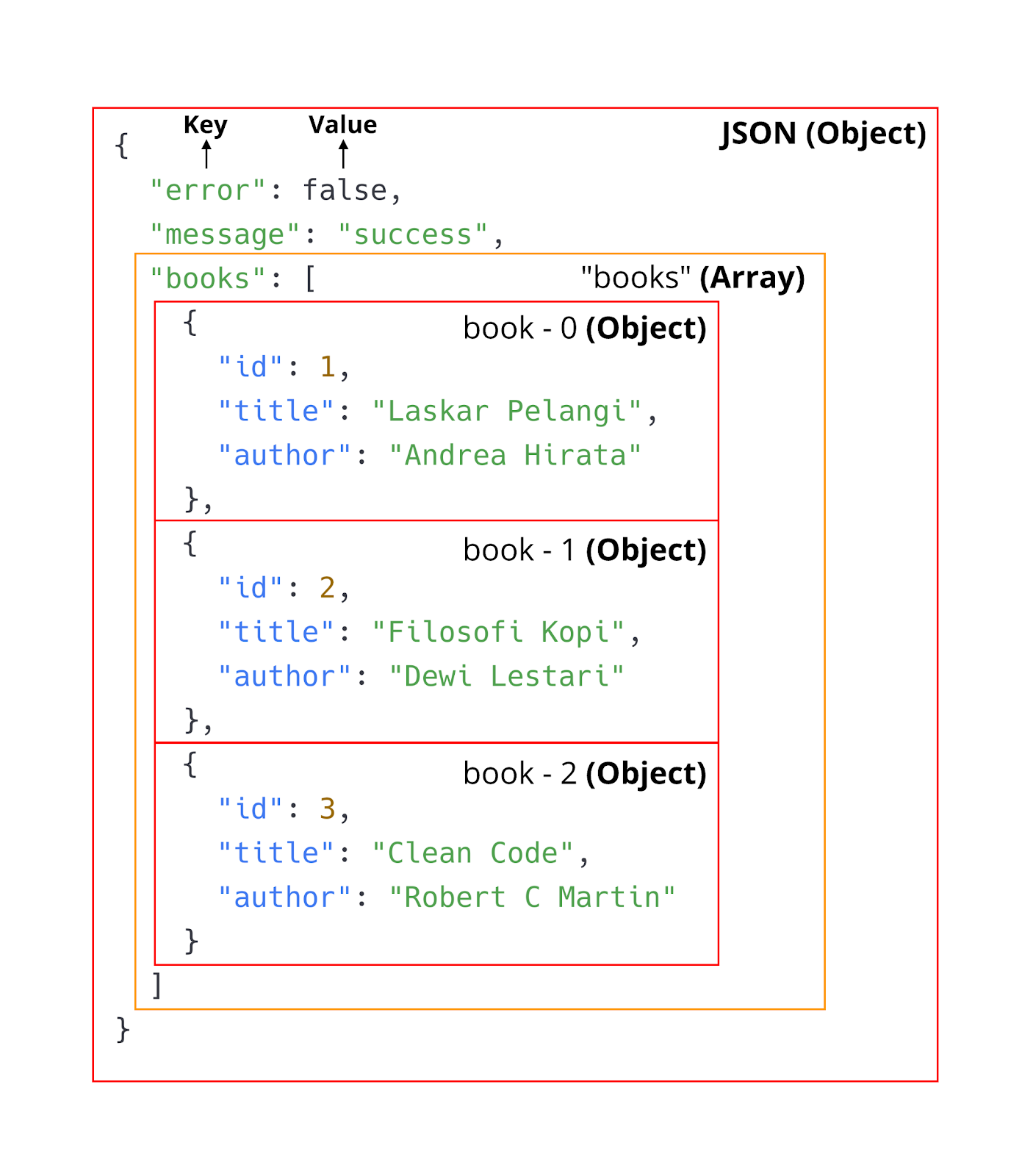
Data yang merupakan objek pada JSON selalu diawali dengan tanda { (buka kurung kurawal)  dan diakhiri dengan tanda tutup kurung kurawal } (tutup kurung kurawal). Sedangkan array pada JSON selalu diawali dengan tanda [ (buka kurung siku) dan diakhiri dengan tanda ] (tutup kurung siku).
20200313225902ae266e132fb41907aef8dbcd4201c57c.png
Struktur dari JSON juga menggunakan format key: value untuk menampilkan datanya. Contoh di atas “error” merupakan key dan false merupakan value. Penulisan JSON hampir identik dengan JavaScript objek. Namun key pada JSON selalu dituliskan di dalam tanda “ “ (kutip dua).

  1. { "message": "success" }


Pada JSON value kita dapat menetapkan nilai dengan berbagai tipe data, di antaranya:
  • String
  • Number
  • Object
  • Array
  • Boolean
  • Null

Using JSON in JavaScript

Setelah mengenal rupa, struktur dan penulisan JSON, selanjutnya bagaimana cara menggunakan JSON pada JavaScript? Sama seperti menggunakan objek JavaScript biasa!

  1. const data = {

  2. "error": false,

  3. "message": "success",

  4. "books": [

  5. {

  6. "id": 1,

  7. "title": "Laskar Pelangi",

  8. "author": "Andrea Hirata"

  9. },

  10. {

  11. "id": 2,

  12. "title": "Filosofi Kopi",

  13. "author": "Dewi Lestari"

  14. },

  15. {

  16. "id": 3,

  17. "title": "Clean Code",

  18. "author": "Robert C Martin"

  19. }

  20. ]

  21. };

  22.  

  23. console.log(`Error? ${data.error}`);

  24. console.log("Daftar Buku: ");

  25. data.books.forEach((book, index) => {

  26. console.log(`${index + 1}. ${book.title} (${book.author})`);

  27. })

  28.  

  29. /* output

  30. Error? false

  31. Daftar Buku:

  32. 1. Laskar Pelangi (Andrea Hirata)

  33. 2. Filosofi Kopi (Dewi Lestari)

  34. 3. Clean Code (Robert C Martin)

  35. */


Kita bisa mengakses data JSON objek menggunakan tanda titik setelah variabel yang menampungnya. Contoh cara mengakses data dengan key books seperti:

  1. data.books


Namun jika key terdiri dari karakter yang tidak dapat digunakan dalam penamaan variabel seperti white space, dash, slash atau yang lainnya, datanya dapat kita askes melalui indexing seperti ini:

  1. const data = {

  2.   ....,

  3.  "book list": [

  4.   ......

  5.  ]

  6. };

  7.  

  8. data["book list"].forEach((book, index) => {

  9.  console.log(`${index + 1}. ${book.title} (${book.author})`);

  10. })

  11.  

  12. /* output

  13. Daftar Buku:

  14. 1. Laskar Pelangi (Andrea Hirata)

  15. 2. Filosofi Kopi (Dewi Lestari)

  16. 3. Clean Code (Robert C Martin)

  17. */


Seperti yang sudah kita ketahui, JSON ini biasanya digunakan untuk transaksi data ke/dari web server. Ketika transaksi data berlangsung, data tersebut selalu dalam bentuk string.
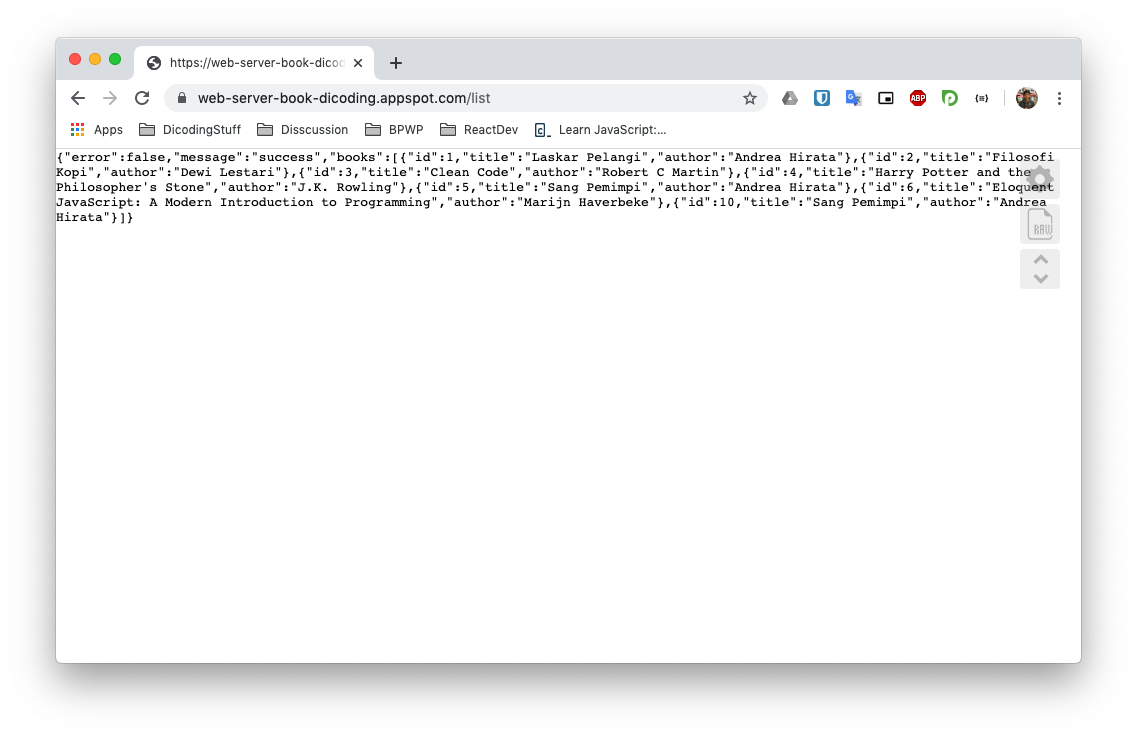
20200313230409c9fc8c2540e6f3f5d173d016dba073e3.pngContoh JSON yang dihasilkan oleh Web Server
Nah untuk mengelola data JSON dalam bentuk string pada JavaScript, kita perlu melakukan parse dengan menggunakan global object JSON. Terdapat dua method penting dalam global object JSON, yang pertama parse() dan yang kedua stringify(). 
Method JSON.parse() digunakan untuk mengubah JSON dalam bentuk String menjadi objek JavaScript. Contohnya seperti ini:

  1. const jsonString = `{

  2.  "error": false,

  3.  "message": "success",

  4.  "books": [

  5.    {

  6.      "id": 1,

  7.      "title": "Laskar Pelangi",

  8.      "author": "Andrea Hirata"

  9.    },

  10.    {

  11.      "id": 2,

  12.      "title": "Filosofi Kopi",

  13.      "author": "Dewi Lestari"

  14.    },

  15.    {

  16.      "id": 3,

  17.      "title": "Clean Code",

  18.      "author": "Robert C Martin"

  19.    }

  20.  ]

  21. }`;

  22.  

  23. const data = JSON.parse(jsonString);

  24.  

  25. data.books.forEach((book, index) => {

  26.  console.log(`${index + 1}. ${book.title} (${book.author})`);

  27. })

  28.  

  29. /* output

  30. Daftar Buku:

  31. 1. Laskar Pelangi (Andrea Hirata)

  32. 2. Filosofi Kopi (Dewi Lestari)

  33. 3. Clean Code (Robert C Martin)

  34. */


Lalu method JSON.stringify() memiliki fungsi sebaliknya. Yaitu mengubah JavaScript objek dalam bentuk JSON string. Contohnya seperti ini:

  1. const data = {

  2.  error: false,

  3.  message: "success",

  4.  books: [

  5.    {

  6.      "id": 1,

  7.      "title": "Laskar Pelangi",

  8.      "author": "Andrea Hirata"

  9.    },

  10.    {

  11.      "id": 2,

  12.      "title": "Filosofi Kopi",

  13.      "author": "Dewi Lestari"

  14.    },

  15.    {

  16.      "id": 3,

  17.      "title": "Clean Code",

  18.      "author": "Robert C Martin"

  19.    }

  20.  ]

  21. };

  22.  

  23. const jsonString = JSON.stringify(data);

  24. console.log(jsonString);

  25.  

  26. /* output:

  27. {"error":false,"message":"success","books":[{"id":1,"title":"Laskar Pelangi","author":"Andrea Hirata"},{"id":2,"title":"Filosofi Kopi","author":"Dewi Lestari"},{"id":3,"title":"Clean Code","author":"Robert C Martin"}]}

  28. */


Apa Itu JSON?
Bookmark

Apa Itu JSON?

Type:
Genre:
Status:
Country:
Keywords: Watch online Apa Itu JSON? bahasa Indonesia, Streaming anime Apa Itu JSON? sub indo, Mau nonton anime terbaik dengan subtitle Indonesia? Streaming anime Jepang dari anime Apa Itu JSON?, website streaming anime subtitle indonesia dan nonton anime indo update setiap hari, TV Apa Itu JSON?, Terbaru Terupdate dan Terlengkap dengan Kualitas 1080p, 720p. 480p, 360p Anime Sub Indo.

Comments

Comment Report Rule
Show Comments
9Anime Comment Policies & Guidelines
  1. Spoiling Content

    Definition

    “Anime Comment” is a spoiler-free section and is usually used for a general discussion about anime without spoiling any content.

    “Episode Comment” may contain spoilers for current or previous episodes. Contents from manga or future episodes are considered as spoilers.

    Hiding spoilers with spoiler tags is not allowed either.

    Consequences

    Minor Spoiler:-

    1st Offense: Warning + Temporary Ban (Ranging 1 day to 3 days)

    2nd Offense Within 30 Days of 1st Offense: Permanent Ban

    Major Spoiler:-

    1st Offense: Permanent Ban

  2. Diversion From Topic

    Definition

    The comment section should be about the anime on hand. Although references from other anime may be used, the core topic of the comments should be about the anime at hand.

    This rule also applies on advertising other streaming websites which results in an instant ban.

    This rule also applies to spam, posting comments like “first”, “second”, etc. are considered spam.

    Consequences

    1st Offense: Warning + Temporary Ban (Ranging 1 day to 3 days)

    2nd Offense Within 30 Days of 1st Offense: Permanent Ban

  3. Flame War

    Definition

    Exchange of angry or abusive messages between the comments. Any form of insulting is also considered as flame war.

    Consequences

    1st Offense: Warning + Temporary Ban (Ranging 1 day to 3 days)

    2nd Offense Within 30 Days of 1st Offense: Permanent Ban

  4. Posting Harmful Link

    Definition

    Post of hyperlinks for websites that may contain viruses or may harm your PC or device.

    Consequences

    1st Offense: Permanent Ban + Deletion of All Comments

  5. Posting NSFW Content

    Definition

    Posting contents that are not safe for work, such as pornographic images or video, ecchi anime, hentai, etc.

    Consequences

    1st Offense: Warning + Temporary Ban (Ranging 1 day to 3 days)

    2nd Offense Within 30 Days of 1st Offense: Permanent Ban

  6. Inappropriate Profile Picture

    Definition

    Using a profile picture that is not safe for work. Although minor ecchi or fanservice is acceptable.

    Consequences

    1st Offense: Warning + Temporary Ban (Ranging 1 day to 3 days)

    2nd Offense Within 30 Days of 1st Offense: Permanent Ban

  7. Use of Common Sense

    Definition

    If you think that you’ll get in trouble for what you’re about to do, don’t do it.

    Consequences

    1st Offense: Warning + Temporary Ban (Ranging 1 day to 3 days)

    2nd Offense Within 30 Days of 1st Offense: Permanent Ban

  8. Upvote Abusing

    Definition

    Creating multiple alternative accounts to upvote your own comments.

    Consequences

    1st Offense: Permanent Ban on All Accounts + Deletion of All Comments

  9. Downvote Abusing

    Definition

    Targeting a user and downvoting all his comments, or creating multiple accounts to downvote one or more comments.

    Consequences

    1st Offense: Permanent Ban on All Accounts

  10. Swearing

    Definition

    Swearing is fine, as long as it’s not directed towards anyone, even as a joke. It may be misinterpreted by a moderator.

    Consequences

    1st Offense: Warning + Temporary Ban (Ranging 1 day to 3 days)

    2nd Offense Within 30 Days of 1st Offense: Permanent Ban

  11. Moderator Verdict

    Definition

    A moderator’s verdict is final and arguing with them will only cause further punishment. If you have a complaint against a staff member, or wish to file a ban appeal, go to the 9Anime Discord Server and post your issue in the #disqus-appeals channel.

    Consequences

    1st Offense: Warning + Temporary Ban (Ranging 1 day to 3 days)

    2nd Offense Within 30 Days of 1st Offense: Permanent Ban

Think you have been unfairly warned or banned?

If you believe that you’ve been unfairly banned or if you have a complaint against one or more Disqus Staff Members, you may post an appeal or complaint on 9Anime Discord Server.

STEPS

  1. Join 9Anime Discord Server: https://discord.gg/xxxxxxx
  2. Read the #rules channel and follow instructions. (Optional, but highly recommended)
  3. Head towards #disqus-appeals channel.
  4. Use the appropriate template to appeal a ban or file a complaint.